Never reprint QR codes again
Static QR codes break fast. SQR lets you update destinations instantly, track scans, and keep every printed QR code working forever.
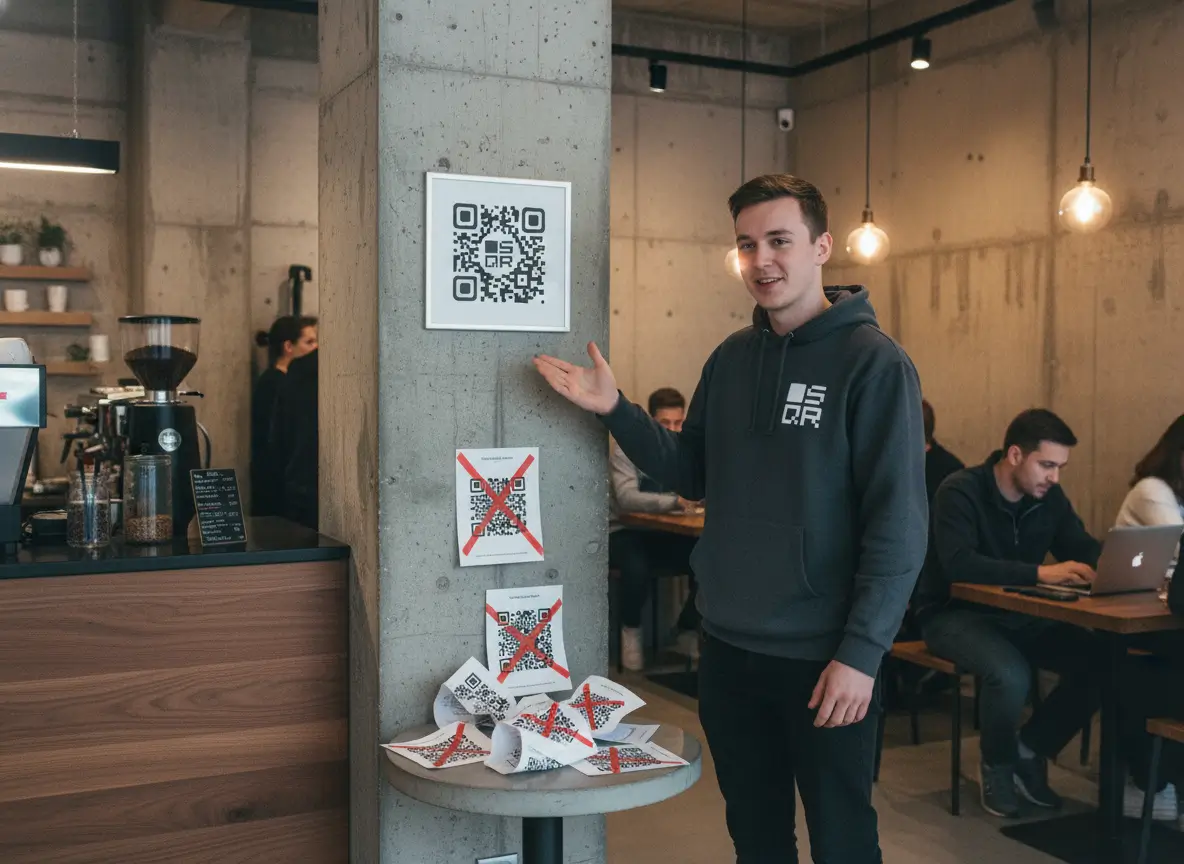
QR codes are everywhere now. Menus, posters, stickers, packaging, shop windows, event badges, receipts. They’ve become the simplest way to connect the offline world to whatever you want online. But most businesses still use them the old way: print a static code, hope nothing changes, and deal with the mess when it does.
That approach worked years ago. It doesn’t work anymore. Links change. Campaigns evolve. Pages move. And every time something shifts behind the scenes, your printed code instantly becomes outdated. That means confusion for customers, lost conversions, and unnecessary reprints. It’s slow, it’s wasteful, and it’s completely avoidable.
With SQR.co, you don’t create a QR code that points to a fixed URL. You create a short link that you can update anytime, and your QR code automatically follows. One code. One print. Full control. Change the destination today, tomorrow, or ten times this month. The QR itself stays the same.
This guide will show you exactly why this matters, how it works, and how you can use it to avoid reprints forever. You’ll also see why adding your own custom domain gives you even more control and trust. After this, you’ll never use static QR codes again.
The Problem With Static QR Codes
Static QR codes look simple, but they create problems the moment your information changes. Most businesses learn this the hard way. You print a batch of menus, flyers, posters, stickers, table tents, whatever. Everything looks clean. The QR code works. Life is good.
Then something changes.
Your menu gets updated.
Your booking link moves.
Your promo expires.
Your website structure changes.
Your Google form is replaced.
Your team launches a new landing page.
And suddenly, the QR code you printed last week sends people to the wrong place. Or a dead page. Or a page that makes you look unprofessional. The code you thought was permanent starts to work against you.
This is the core issue with static QR codes: once they’re printed, they’re locked. They can’t adapt to your business. If anything changes behind the scenes, your printed material becomes outdated immediately.
Most businesses end up doing one of two things:
- They ignore the problem.
People scan a code that doesn’t work anymore. You lose trust, conversions, and sometimes the customer entirely. They don’t scan twice. - They reprint everything.
More time, more money, more waste. This is where frustration kicks in. Nobody wants to reprint hundreds of menus because one URL changed.
Both options cost you. One drains your brand. The other drains your budget.
Another issue: static QR codes don’t give you any data. You don’t know how many people scanned them, when they scanned, or what device they used. You print, you hope, and that’s the end of the story. In 2025, that’s not good enough. Businesses want to know what works. They want to track engagement. They want to make decisions based on data, not guesses.
And here’s the part most people don’t think about: static QR codes force your business to stay rigid. You can’t improve your marketing in real time. You can’t run quick A/B tests. You can’t redirect traffic during a campaign. You can’t fix mistakes on the fly. If something needs to change, your only option is to start over.
This is exactly why dynamic QR codes exist. But most tools make the idea more complicated than it needs to be. In reality, all you want is simple control. A QR code that never changes on the outside, but can change as many times as you want on the inside.
That’s the shift happening across restaurants, retail, agencies, gyms, real estate, and events. People are done reprinting. They want one QR code that lasts forever. One code they can update from a dashboard in seconds. One code that adapts to their business instead of forcing the business to adapt to the print.
Static QR codes had their moment. They worked when everything was slow, fixed, and offline. But businesses today move fast. Campaigns change. Products change. Links change. And your QR codes need to keep up.
This section sets the stage for the solution: dynamic QR codes powered by short links inside SQR.co. When you can edit the destination instantly, you never have to reprint again.
 Frank Barker
The SQR.co Solution: Dynamic QR Codes
Most QR tools still lock you into the same old problem: once you generate the code, the destination can’t change. SQR.co flips that completely. Instead of linking your QR code directly to a final URL, you link it to a short link you control inside your dashboard. That short link becomes the brain behind the QR code. You can change its destination whenever you want, instantly, without ever touching the printed code.
This sounds simple, and it is. But the impact is huge.
With SQR, the moment you update the short link, every scan of that QR code points to the new destination. No reprints. No downtime. No awkward “Sorry, the link doesn’t work” moments. You fix everything with one edit.
For businesses, this is freedom. You’re no longer stuck with static decisions. You get a flexible system that adapts as your business changes. And every business changes.
Restaurants update menus.
Gyms update schedules.
Agencies rotate campaigns.
Retail stores switch product pages.
Event organizers change landing pages.
Creators update offers.
Hotels adjust booking links.
All these updates happen online. They should happen in your QR flow too.
SQR’s dynamic approach means your QR code becomes a permanent asset instead of a disposable one. You print it once and keep it alive forever. That saves you time, money, and frustration. But it also gives you something static QR codes never can: control.
You control where traffic goes.
You control the timing.
You control the changes.
You control the branding.
You control the data.
Tracking is built right in. Every short link shows you how many scans you’re getting, from which device, on what day. You see what’s working and what isn’t. Static QR codes leave you blind. SQR gives you a full dashboard. And once you see the data, you start thinking differently. You adjust your campaigns faster. You refine your print materials. You optimize instead of guessing.
The best part: the system stays simple. You don’t need technical skills. You don’t need developers. You don’t need IT. If you can paste a URL, you can use SQR. Updating a link takes a few seconds. And because the QR code itself never changes, your printed materials stay valid across months, seasons, or entire years.
This also makes SQR perfect for businesses that scale. If you run multiple locations, multiple products, or multiple clients, you can manage everything from one dashboard. Agencies especially love this, because they can run dozens of campaigns without constantly asking clients to reprint their materials. You update the link, the client’s QR code keeps working, and the campaign moves forward smoothly.
The shift from static to dynamic QR codes isn’t a small upgrade. It’s a new way of running your offline-to-online connection. Once you have control over the destination, you remove 90 percent of the pain that comes with printed QR codes.
This is why more restaurants, cafés, gyms, hotels, agencies, real estate teams, and local businesses are switching to SQR every day. They want reliability. They want flexibility. And they want a system that doesn’t break the moment something changes.
With SQR, your QR codes finally work the way they should. One print. Endless updates. Full control.
How It Works (Step by Step)
The idea behind SQR is simple: separate the QR code from the final destination. Once you understand that, everything else clicks into place. Here’s exactly how it works in practice.
Step 1: Create a short link in your SQR dashboard
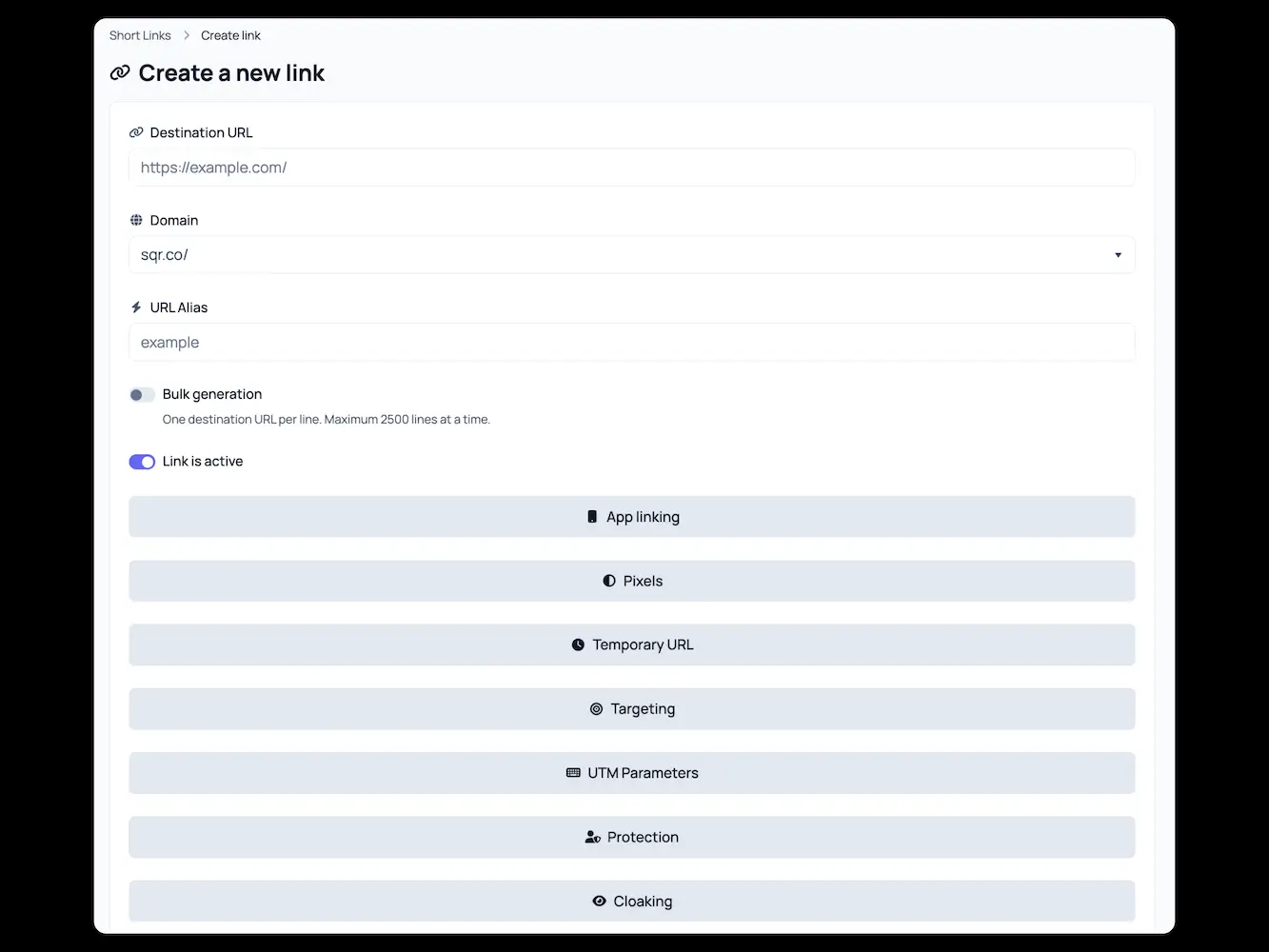
This is the core of everything. You take the final destination you want people to reach — a menu, a form, a booking page, a landing page, anything — and you turn it into a short link inside SQR. This short link is what your QR code will actually point to. Think of it like a flexible bridge between the scan and the final page.
- Add the destination URL (this one you can change at anytime)
- Choose the domain (SQR.co or your custom domain)
- Choose an URL Alias (like /our-menu)
- Hit Create
Step 2: Generate a QR code based on that short link
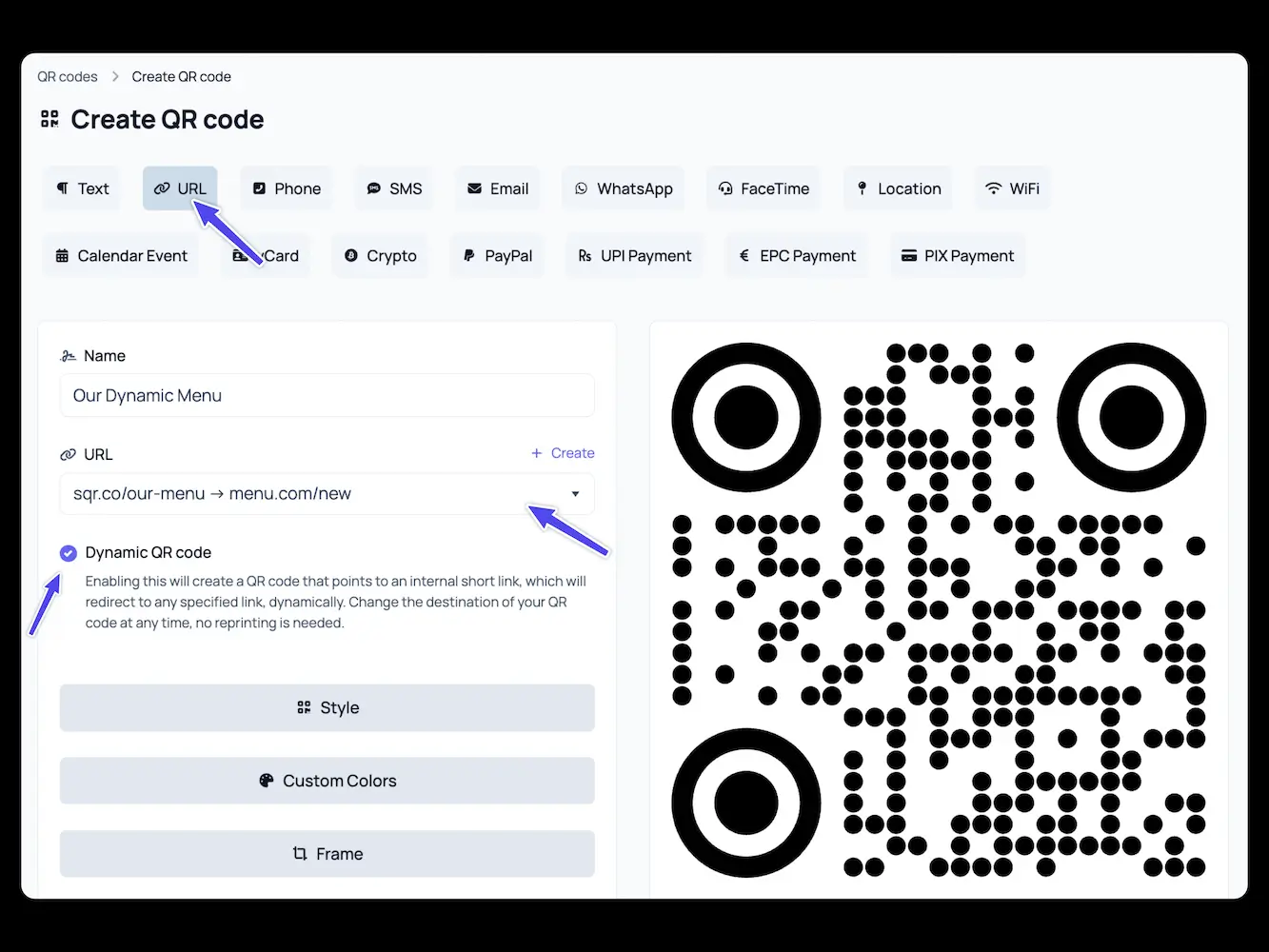
When you create a short link, you can instantly generate a QR code for it. This QR code is permanent. It’s not tied to a single URL. It’s tied to your short link, which you control. Print it, stick it, display it, embed it — this code is the one your customers will scan forever.
- Choose
URLas the QR type - Select the
Dynamic QR codecheckbox - Choose your newly created
short linkfrom the dropdown - Hit
Createto save
Step 3: Change the destination anytime (without reprinting)
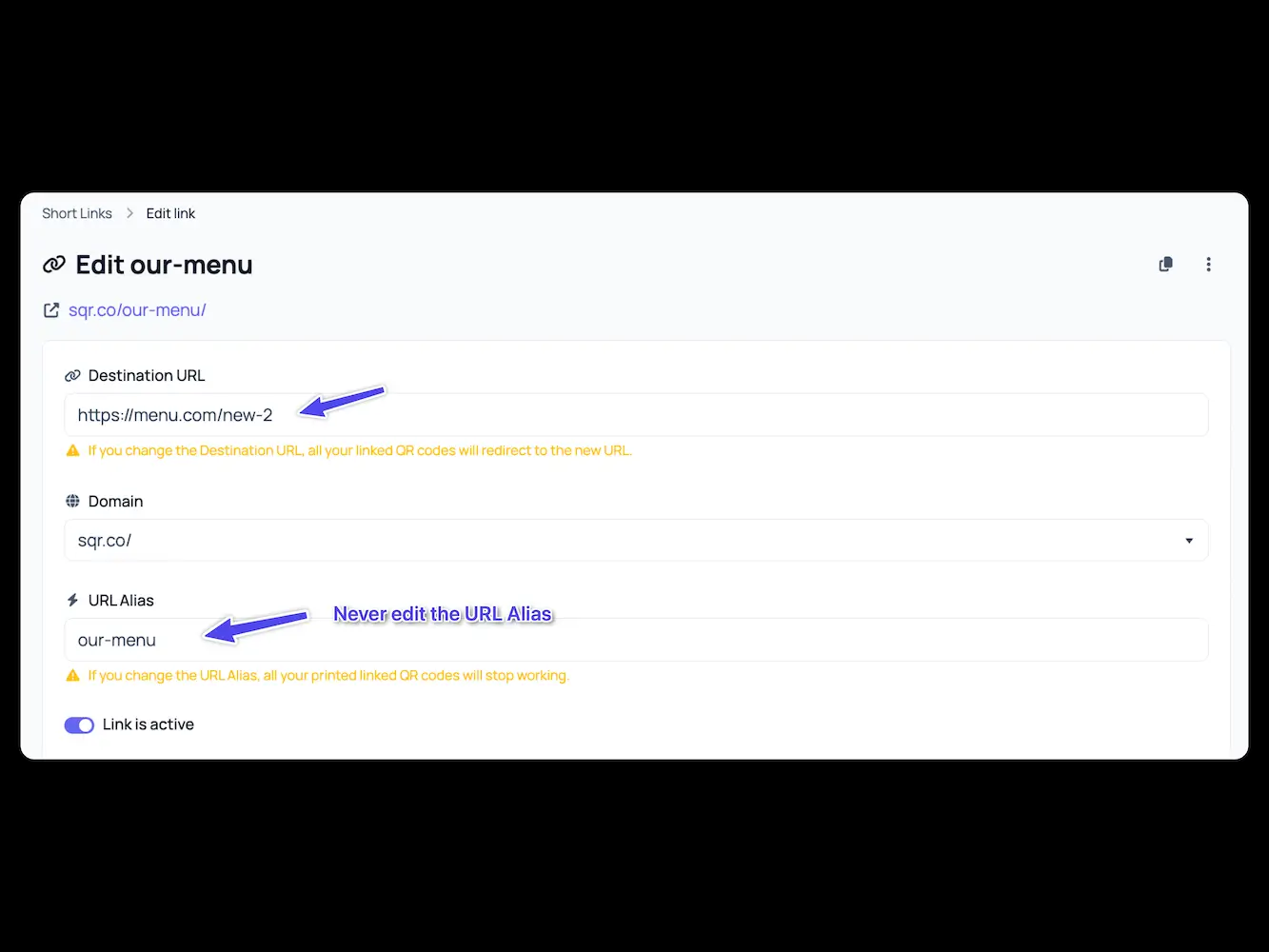
This is where the magic happens. If you ever need to update the link behind your QR code, you don’t touch the QR code itself. You simply edit the short link inside your SQR dashboard and paste in the new destination. The QR code stays the same. The people scanning it are sent to whatever you choose next. Fast, clean, and instant.
- Go to your short link
- Edit the
Destination URLwhenever needed - Hit
Save
The design of the QR code won't change only the destination of the short link connected to the QR code, so no need for reprints.
Step 4: Track every scan

The moment someone scans your code, SQR records it. You’ll see how many scans you get, when they happen, and from which devices. This gives you real insight into your offline engagement. Maybe your posters work great, but your flyers don’t. Maybe your table stickers are scanned more in the evening than the morning. Maybe your event code spikes during certain hours. You finally see what’s happening.
Step 5: Optimize or redirect as needed
Because you can track and update instantly, you can make smarter decisions. You can redirect traffic during busy seasons. You can switch the landing page for a limited-time promo. You can test different destinations to see which converts better. Small businesses rarely get this kind of agility. With SQR, it’s built in.
Real examples
A restaurant updates its menu twice a month. Instead of ordering new prints, they update the link.
A gym changes its class schedule every quarter. One QR code handles it forever.
An agency runs 50 campaigns across clients. Every QR code stays the same; the links rotate as needed.
A creator launches a new offer. They update the link, and the same QR sends traffic to the new page.
A hotel wants to test two different booking links. They switch destinations in seconds.
In every case, the printed QR code becomes a permanent tool instead of a temporary one. You print it once. It keeps working. Your business stays flexible.
This step-by-step flow is what makes SQR simple to use and powerful to scale. No complex tech. No headaches. Just full control over every QR code you produce.
Custom Domains: Full Control and Stronger Branding

A custom domain is one of the simplest upgrades you can make to your QR setup, and it immediately changes how people experience your brand. Instead of sending customers to a generic short link, you send them to something that looks like it belongs to you. It’s cleaner, more trustworthy, and much more professional. When someone scans your QR code and sees a link like menu.yourbrand.com or go.yourgym.com, they instantly feel more confident about where they’re going. That tiny moment of trust is what helps people continue instead of hesitating.
Generic links work, but they don’t say anything about you. They look anonymous, and in some cases, a little suspicious. A branded domain does the opposite. It signals intention. It shows that you’ve put thought into the experience. For businesses where every scan might lead to a booking, an order, a form submission, or a sale, that small extra layer of trust makes a clear difference. People scan, they see a familiar domain, and they continue without thinking twice. Over time, that adds up to higher conversions and fewer drop-offs.
Using a custom domain also puts the entire redirect system fully under your control. You’re not sharing a domain with thousands of other businesses. You’re not relying on a third-party URL structure. You own the domain. You decide how links are created and how traffic flows. If you want to move a page, restructure your website, switch platforms, or run a seasonal campaign, you can do it freely. Your short links stay the same, your QR codes stay valid, and your printed materials never become outdated. The stability alone makes a custom domain worth it.
This becomes even more valuable when your business grows. As you launch more campaigns, add more locations, or produce more physical materials, having everything run through a domain you control keeps things organized. You don’t end up with random links scattered across different platforms. Every QR code, every redirect, every destination lives inside one clean system that belongs to you.
For agencies, custom domains are a must. Instead of juggling different tools or sending clients random-looking links, you use one branded domain and create structured short links for every client. Something like links.agencyname.com/client1, links.agencyname.com/client2, or campaign-specific variations. It keeps everything inside one dashboard, looks professional during client handovers, and makes updates painless. When a client changes a page, you update the redirect. When a campaign ends, you swap the destination. When a client wants to test two landing pages, you handle it in seconds. No reprints. No confusion.
A custom domain also increases your resilience. If you ever move your main website, redesign it, or switch platforms entirely, your SQR links keep working because they’re independent from your website structure. You stay in control of every redirect with zero interruption. This stability is important for restaurants, gyms, retail stores, hotels, and any business with a lot of printed QR codes in the wild.
In short: a branded domain gives you trust, better performance, cleaner branding, and the confidence that every QR code you print will work long-term. If you want full control over your QR system, this is the foundation.
Why It Matters (Real Benefits)
Dynamic QR codes sound simple, but the impact on your business is huge. Once you switch from static codes to a system you can actually control, everything becomes easier, cleaner, and more reliable.
The biggest benefit is obvious: no reprints. You create one QR code and it stays valid forever. Menus change, pages move, products evolve, campaigns rotate — and nothing breaks. You open your SQR dashboard, update the destination, and every printed QR code instantly points to the new page. That alone saves businesses hours of work and a lot of money. No more reordering menus, stickers, flyers, or posters just because a link changed.
Another major benefit is zero downtime. If a link stops working, you can redirect it within seconds. Your customers don’t see broken pages, dead forms, or outdated content. That level of flexibility makes your offline materials feel as dynamic as your website. Most businesses only realize how important this is after their first broken campaign. With SQR, you avoid that completely.
Then there’s accurate tracking. Static QR codes leave you blind. You never know how many people scanned them or when they scanned. SQR fixes that. Every scan is logged automatically, so you can finally see which materials perform well and which ones don’t. You might learn that your posters get scanned at night, your table stickers get scanned at lunch, or your event code spikes during certain hours. This kind of insight helps you improve your marketing instead of guessing.
Everything lives inside one centralized dashboard. No need to jump between tools, spreadsheets, or platforms. All your QR codes, short links, destinations, statistics, and redirects sit in one place. If you manage multiple locations or multiple campaigns, this keeps everything clean and easy to operate. You always know where things are and how they’re performing.
And the system scales with your business. Whether you have one QR code or a hundred, the workflow stays the same. As you add campaigns, products, or clients, nothing gets harder. You can handle growth without adding complexity. This is especially valuable for agencies and multi-location businesses that need long-term reliability.
When you zoom out, the benefits are simple: you save time, avoid mistakes, increase trust, get data, and stay in control. Printed QR codes become long-lasting assets instead of disposable items. Your business becomes more flexible, more professional, and easier to manage. That’s why switching to dynamic QR codes isn’t a small upgrade — it’s a fundamental improvement to how your offline and online worlds connect.
Frequently asked questions about Dynamic QR codes
Can one QR code point to different pages based on rules or targeting?
Yes. You can set targeting options like device type, country, language, or time-based redirects. One QR code can behave differently for different users.
Can I schedule redirects in advance?
Yes. You can set start and end dates for campaigns so your QR code automatically switches destinations without manual updates.
Can I rotate multiple destinations for the same QR code?
Yes. You can use rotation to split traffic between multiple URLs. Perfect for testing, load balancing, or running two offers at once.
What happens if my destination page is slow or down?
You can redirect the short link to a backup URL instantly, keeping your QR code functional even if your main website has issues.
Can I password-protect the link behind my QR code?
Yes. You can set password protection on short links if you need controlled access.
Can I expire a link after a specific time?
Yes. You can set expiration dates so a QR code stops working or moves to a fallback page after a certain date.
Can I add UTM parameters for marketing tracking?
Yes. You can attach UTM tags to destinations so your scans show up clearly in Google Analytics or other tools.
Does SQR support deep links (apps)?
Yes. You can redirect to mobile apps, app stores, or deep-linked content depending on the user’s device.
Can I create multiple QR codes pointing to the same short link?
Yes. Many QR codes can share one short link, making campaign management easier across locations or materials.
What happens if I delete a short link?
The QR code becomes inactive. But you can restore or recreate a link and reconnect it at any time.